Bosscha Raws: Mastering the Art of Handwritten Brush Typography
In the crowded landscape of digital design, authenticity is the currency that buys attention. We have all scrolled past sleek, vector-perfect logos and polished corporate identities that feel sterile. This is where Bosscha Raws enters the conversation, not just as a typeface, but as a tool for injecting human warmth into commercial projects. As a handwritten brush texture font, it offers a level of organic detail that standard digital fonts simply cannot replicate. However, possessing a high-quality asset is only half the battle. Many designers, marketers, and small business owners stumble not because the tool is flawed, but because they misunderstand how to wield its raw power effectively.
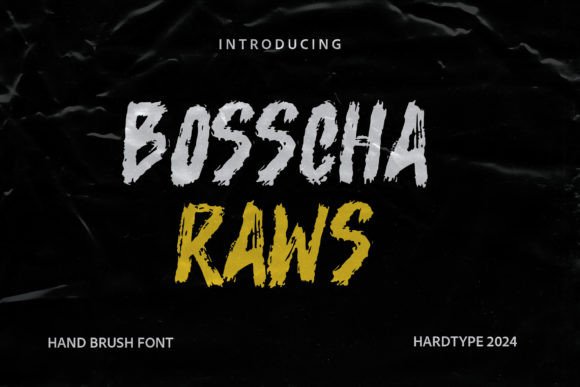
The appeal of Bosscha Raws lies in its intricate texture. It is not merely a shape; it is a simulation of ink meeting paper, complete with the subtle imperfections that signal craftsmanship. This makes it exceptionally suitable for logos, product branding, printable templates, posters, flyers, and shirts. Yet, the very features that make it stunning—its detailed texture and all-caps structure—are often the source of common design errors. By understanding these pitfalls, you can elevate your work from amateurish to professional.
The Trap of Over-Texturing
One of the most frequent mistakes creators make when using a textured font like Bosscha Raws is ignoring the background context. Because the font comes with a very detailed texture, placing it over a busy or complex image creates visual noise. The eye struggles to distinguish the letterforms from the background patterns, resulting in poor readability and a cluttered aesthetic. This is particularly detrimental for text overlays on background images, where the goal is immediate communication.
To avoid this, always prioritize contrast. If you are using Bosscha Raws for a poster or a social media graphic, ensure the background is solid, gradient-based, or significantly blurred. A better approach is to use a semi-transparent overlay between the image and the text. This preserves the mood of the photograph while allowing the detailed brush strokes of the font to stand out clearly. Remember, the texture of the font is a feature, not a distraction. Let it breathe.
Misunderstanding the All-Caps Constraint
It is crucial to note that Acorn Brush font, which shares similar stylistic DNA with Bosscha Raws in the brush category, often comes in all caps. Bosscha Raws follows this tradition, offering an uppercase-only character set with punctuation and numerals. A common misunderstanding among beginners is attempting to force a "sentence case" look by manually resizing letters or mixing it with incompatible serif fonts without proper hierarchy. This leads to inconsistent baseline alignment and a disjointed visual rhythm.
Instead of fighting the all-caps nature, embrace it. All-caps typography conveys authority, stability, and boldness. Use Bosscha Raws for headlines, short taglines, or brand names where impact is required. For body text or longer explanations, pair it with a clean, neutral sans-serif font. This contrast allows the expressive quality of the brush font to shine without overwhelming the reader. When designing for shirts or flyers, keep the text concise. The detailed texture requires space to be appreciated; cramming too many words into a small area will cause the details to merge into a blurry mess, especially when printed.
Ignoring Print Resolution and Scale
For entrepreneurs and small business owners creating physical products, such as printable templates or merchandise, scale is a critical factor often overlooked. A font that looks crisp on a retina display may lose its definition when printed on a t-shirt or a flyer if the resolution is not managed correctly. The detailed texture of Bosscha Raws relies on fine variations in opacity and edge roughness. If the design is scaled down too much, these details vanish, leaving behind what looks like a low-resolution artifact rather than a deliberate artistic choice.
Before finalizing any design for print, always test at 100% zoom. Check how the numerals and punctuation render. Since Bosscha Raws includes multilingual support, ensure that special characters maintain their integrity at the intended size. If you are designing a logo, create versions with simplified textures for small-scale applications, such as business cards or favicon icons, while reserving the full-detail version for larger formats like banners and storefront signage. This ensures brand consistency across all touchpoints without sacrificing legibility.
Neglecting Multilingual Nuances
While the inclusion of multilingual support is a significant advantage, it does not mean every language will render with the same cultural appropriateness or aesthetic balance. Designers working on global branding projects sometimes assume that a brush font translates universally. However, the stroke weight and spacing that look dynamic in English might appear cramped or awkward in languages with different character densities.
To mitigate this, always review the kerning and tracking for non-Latin scripts or extended character sets. Adjust the spacing manually if necessary to maintain the organic flow of the brush strokes. This attention to detail demonstrates respect for the target audience and enhances the perceived quality of the brand. It is not enough to simply type the words; you must curate the visual experience for each linguistic context.
Choosing the Right License and Source
Finally, a practical warning regarding acquisition: ensure you are downloading Bosscha Raws from a reputable source with a clear commercial license. Many free font repositories bundle files with malware or offer restricted personal-use licenses that can lead to legal issues for businesses. Using a font illegally for client work or product branding can result in cease-and-desist letters, fines, and reputational damage.
Invest in the proper license. It is a small cost compared to the risk of legal complications. Furthermore, verified sources often provide updated files with better hinting and broader language support. Before making a decision, check the file formats included. Ensure you have both OTF and TTF versions for compatibility across different design software and operating systems. This foresight prevents technical headaches during the production phase.
In conclusion, Bosscha Raws is a powerful asset for those willing to respect its characteristics. By managing background contrast, embracing the all-caps structure, respecting print scales, adjusting for multilingual needs, and securing proper licensing, you can avoid common pitfalls. The result is a design that feels authentic, professional, and deeply engaging. Use these insights to refine your approach, and let the detailed texture of your typography do the heavy lifting in your visual communication.