Vultura Typeface: Evaluating Its Impact on Modern Branding and Design
In the crowded landscape of digital typography, selecting a typeface that balances aesthetic appeal with functional versatility is a critical decision for designers and brand managers. Vultura has emerged as a notable contender in this space, offering a bold and captivating presence that distinguishes itself from more conventional sans-serif options. Designed to make a statement, this font combines sleek, contemporary lines with unique character details that cater to projects demanding immediate visual attention. Understanding where Vultura fits within the broader ecosystem of display fonts requires a closer look at its design philosophy, technical features, and practical applications compared to other stylistic alternatives.
Defining the Aesthetic Identity of Vultura
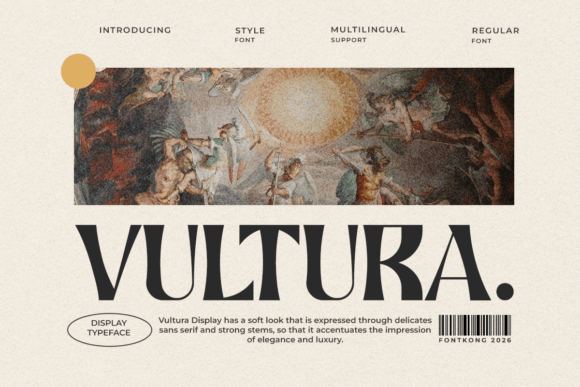
At its core, Vultura is a display typeface characterized by its powerful presence and modern flair. Unlike neutral text fonts designed for long-form readability, Vultura is engineered for impact. Its structure features clean, geometric influences softened by subtle stylistic quirks that prevent it from appearing sterile or overly corporate. This balance makes it particularly effective for headlines, logos, and posters where the primary goal is to capture the viewer’s eye within seconds.
The distinctiveness of Vultura lies in its ability to convey confidence without sacrificing elegance. The letterforms are constructed with a consistent stroke weight that ensures visibility across various mediums, from large-format print banners to high-resolution digital screens. For creative professionals, this means the font can serve as the cornerstone of a visual identity, providing a cohesive look that feels both current and timeless. When evaluating Vultura against other bold typefaces, one notices its specific attention to spatial harmony, ensuring that even at larger sizes, the spacing between characters remains optically pleasing.
Technical Advantages: The Role of PUA Encoding
Beyond its visual attributes, Vultura offers significant technical benefits that streamline the design workflow. A key feature is its PUA (Private Use Area) encoding. For designers unfamiliar with this term, PUA encoding allows access to special glyphs, swashes, and alternate characters directly through standard keyboard shortcuts or character maps, without the need for complex OpenType feature activation in every software environment.
This accessibility is a major differentiator when comparing Vultura to older or less optimized font files. In practical terms, it means you can easily insert decorative elements or stylistic alternates to customize a logo or headline. For instance, adding a subtle swash to a capital letter can transform a standard wordmark into a bespoke graphic element. This level of customization is crucial for branding projects where uniqueness is paramount. While many premium fonts offer extensive glyph sets, the ease of access provided by PUA encoding in Vultura reduces friction during the creative process, allowing designers to experiment more freely.
Comparative Analysis: Vultura vs. Traditional Display Fonts
When choosing a typeface, it is helpful to categorize options based on their intended use. Vultura falls squarely into the "modern display" category, but how does it compare to other common approaches?
- Vs. Classic Serifs: Traditional serif fonts often convey heritage and authority. Vultura, being sans-serif, projects modernity and innovation. If a brand aims to appear established and traditional, a serif might be preferable. However, for tech startups, lifestyle brands, or contemporary retail, Vultura’s clean lines align better with current design trends.
- Vs. Minimalist Sans-Serifs: Ultra-minimalist fonts prioritize neutrality. While versatile, they can sometimes lack personality. Vultura introduces distinctive character shapes that add flavor without becoming distracting. It strikes a middle ground between neutrality and expressiveness, making it suitable for brands that want to be noticed but not overwhelmed by their typography.
- Vs. Decorative Script Fonts: Script fonts offer high elegance but often suffer from readability issues at smaller sizes or in all-caps formats. Vultura maintains high legibility while still offering stylistic flourishes via its PUA-encoded glyphs. This makes it a more versatile choice for projects that require both impact and clarity.
Understanding these tradeoffs helps in determining whether Vultura is the right tool for a specific job. It is not a universal solution for body text, but it excels in roles where visual hierarchy and immediate recognition are required.
Ideal Use Cases and Practical Applications
To maximize the value of Vultura, it is essential to deploy it in contexts that leverage its strengths. Here are several scenarios where this typeface performs exceptionally well:
- Brand Logos and Wordmarks: The bold structure of Vultura ensures that logos remain legible even when scaled down for social media avatars or favicons. The availability of unique glyphs allows for custom ligatures, creating a proprietary look that competitors cannot easily replicate.
- Advertising and Posters: In print and digital advertising, you have only a few seconds to communicate a message. Vultura’s commanding presence makes it ideal for headline text that needs to stand out against busy backgrounds or compete with other visual elements.
- Packaging Design: Product packaging benefits from typography that conveys quality and modernity. Whether used on minimalist cosmetic labels or bold beverage cans, Vultura adds a premium feel that appeals to contemporary consumers.
- Digital Media Headers: For websites and apps, Vultura works effectively in hero sections and banner ads. Its contemporary style aligns well with modern UI/UX design principles that favor clean, impactful typography over ornate decoration.
It is important to note that while Vultura is versatile within the display category, it should be paired with a more neutral, highly readable font for body copy. Using a bold display font for long paragraphs can cause reader fatigue. A common best practice is to combine Vultura with a simple, open-source sans-serif for supporting text, creating a balanced typographic hierarchy.
Limitations and Decision Factors
No typeface is perfect for every situation, and honest evaluation requires acknowledging limitations. Vultura is primarily a display font. Attempting to use it for dense textual content, such as legal documents, academic papers, or lengthy blog posts, would likely result in poor readability. Its bold nature and unique character shapes are designed for short bursts of information, not sustained reading.
Additionally, designers should consider the tone of their project. Vultura exudes confidence and modernity. If a project requires a playful, handwritten, or strictly formal corporate tone, other typeface categories may be more appropriate. For example, a children’s educational app might benefit more from a rounded, friendly font, while a law firm might prefer a traditional serif. Vultura sits firmly in the realm of contemporary professionalism and bold creativity.
Another factor is licensing and usage rights. Always ensure that the license purchased covers the intended media, whether it is web embedding, print distribution, or commercial product creation. The technical ease of PUA encoding is a benefit, but it does not replace the need for proper licensing compliance.
Making an Informed Choice
Selecting Vultura should be a deliberate decision based on the specific goals of your design project. It is an excellent choice when you need to elevate branding materials, create eye-catching advertisements, or establish a modern visual identity. Its combination of sleek aesthetics, powerful presence, and user-friendly technical features like PUA encoding makes it a valuable asset in a designer’s toolkit.
However, it is most effective when used strategically. By pairing it with complementary typefaces and reserving it for high-impact elements, you can harness its full potential without overwhelming the viewer. As with any design resource, the key is alignment: does the font’s personality match the brand’s voice? For those seeking a bold, contemporary, and distinctive typographic solution, Vultura offers a compelling option worth serious consideration. Evaluate your project’s needs, test the font in real-world scenarios, and determine if its unique character design provides the modern flair your creative work demands.